
Support for PLGS v2.4 and v2.5

About this plug-in
This plugin allows you to import peptide identification results from Waters MSᴱ data generated by ProteinLynx Global Server (PLGS). The Waters RAW folders should be loaded directly into PLGS. Results are exported from PLGS using an XML output format suitable for Progenesis LC-MS.
To produce and import the correct XML format you must install plugins to both Progenesis LC-MS and PLGS. Detailed installation instructions can be found on the download page.
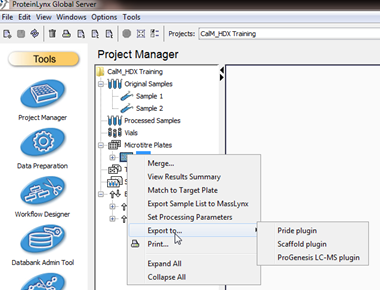
Once the plugins have been installed, export from PLGS as shown here:
- Right-click on the Microtitre plate.
- Select Export to ProGenesis LC-MS Plugin.
- In the Select Results dialog, select the files to export.